

Free, open-source extension that blocks every ad — no exceptions, no paid whitelists.
by: AdBlocker Ultimate
for: Android, iOS, macOS, Windows


Developer:
AdBlocker Ultimate
Type:
Ad blocker
AdBlocker Ultimate is a free, open-source ad-blocking browser extension available across Chrome, Firefox, Edge, Opera, and Safari, with additional standalone system apps for Windows, macOS, Android, and iOS. Its defining promise — one it actually keeps — is a strict “no acceptable ads” policy: unlike Adblock Plus, which lets advertisers pay to bypass filters, AdBlocker Ultimate blocks everything with no pre-set exceptions. It’s built for general users who want effective, trustworthy ad-free browsing without spending money or learning filter syntax. It’s not the right tool for power users who need uBlock Origin’s advanced dynamic filtering, or for anyone who streams heavily on Twitch or Hulu and expects flawless ad blocking on those platforms.
After installing from your browser’s extension store — the Chrome Web Store, Firefox Add-ons, or Edge Add-ons — the extension is active immediately with no account or setup required. It runs silently in the background, checking every network request your browser makes against its built-in filter lists. When it matches a request to a known ad domain, tracker, or malware-distributing hostname, it blocks the connection before it loads. Cosmetic filters then hide any blank element left behind, so the page appears clean rather than broken. If a site you want to support stops getting ad impressions, you click the extension icon and toggle off blocking for that specific domain — your choice, not the developer’s. On mobile, the Android system app works differently: it routes all device traffic through a local VPN tunnel, intercepting ad requests from every installed app, not just the browser.
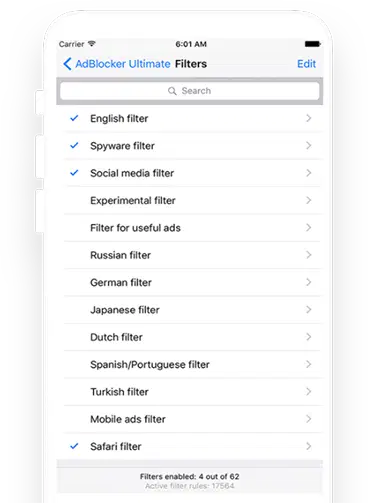
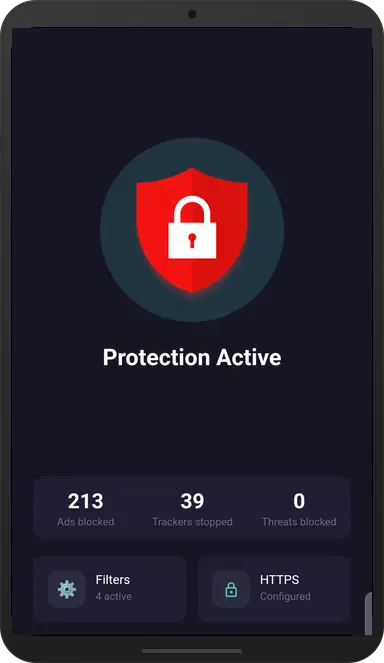
The browser extension is about as friction-free as an ad blocker gets. There’s a single toolbar icon, a one-click toggle for per-site whitelisting, and a settings panel that surfaces filter lists, the custom allowlist, and the privacy filter without overwhelming a non-technical user. The extension doesn’t demand you understand filter syntax to use it effectively out of the box. The standalone Windows and Android apps have a slightly more functional-than-beautiful interface — they communicate status clearly but don’t push design beyond utility. For the zero-cost browser extension, the UX more than justifies what you pay for it. The iOS Safari implementation is the weakest surface: it’s limited to basic Safari content blocking with no system-wide capability, which makes it feel thin compared to the extension experience on desktop.
On Firefox, AdBlocker Ultimate performs well and reliably — the browser’s extension model lets it fetch and apply filter updates dynamically, so YouTube anti-adblock scripts are countered quickly. On Chrome and Edge, Google’s Manifest V3 framework is a real constraint: new filter rules must pass through the Chrome Web Store review process before reaching users, creating a documented 1-to-5-day lag window during which new YouTube anti-adblock scripts may cause black screens or anti-adblock warnings. This isn’t a failure of AdBlocker Ultimate specifically — it affects every MV3-compliant extension — but it’s a practical limitation Chrome users need to accept. Memory usage is moderate; running it alongside another ad blocker like uBlock Origin will cause conflicts, RAM spikes, and page rendering issues. Pick one and stick with it. The Android VPN app shows minimal battery impact in standard use, though it occupies Android’s single VPN slot.
AdBlocker Ultimate’s privacy posture is strong for a free product. The extension is open source under GPLv3, meaning anyone can audit what it does with your browser data. There is no “acceptable ads” revenue model requiring relationships with advertisers, which eliminates one of the most common conflicts of interest in the ad-blocking space. The extension requests only the permissions necessary to inspect and block network requests — it does not request access to your passwords, form data, or camera. Public discussions have noted that AdBlocker Ultimate’s engine appears to be a fork of AdGuard’s open-source code, which is perfectly legal under open-source licensing but worth knowing for users who want updates straight from the upstream source. The standalone Android app uses a local VPN that processes traffic on-device, not through external servers.
The browser extension is free, permanently, with no feature gates — every blocking category, the privacy filter, and custom whitelisting are all available from install. For Indian users, this means a genuinely capable ad blocker with zero recurring cost. The standalone Windows and Android apps introduce a 14-day trial after which a paid license is required; current pricing is not listed publicly and must be checked on the official site at checkout. Compared to AdGuard’s extension, which is also free for browser use, AdBlocker Ultimate differentiates itself mainly on the “no acceptable ads” policy — AdGuard’s paid tier adds system-wide filtering that AdBlocker Ultimate’s paid apps also attempt, though tech reviewers generally rate AdGuard’s polish and update cadence higher at the system app level.
vs. uBlock Origin: AdBlocker Ultimate wins on simplicity and approachability for non-technical users — there’s no learning curve to get strong blocking. uBlock Origin wins on efficiency (significantly lower RAM and CPU usage), update speed on Firefox, and advanced dynamic filtering modes that give power users control AdBlocker Ultimate can’t match.
vs. AdGuard: AdBlocker Ultimate wins on cost for browser-only use (both are free as extensions, but AdGuard’s system apps are more expensive) and on the stricter no-whitelist stance for users suspicious of commercial ad blockers. AdGuard wins on overall ecosystem quality — its system apps for Windows, Mac, iOS, and Android are more polished, faster to update, and better at catching HTTPS-delivered ads that survive DNS or network-level blocking.
Genuinely zero whitelist
Works across every major browser
No account or setup required
Open-source and auditable
Chrome Manifest V3 lag is real
Paid system apps are required for non-browser blocking
Android app requires APK sideloading
Free, open-source extension that blocks every ad — no exceptions, no paid whitelists.
by: AdBlocker Ultimate
All files are original, sourced from official developer.
The download will start from the developer’s website.
AnySoftware does not host, repack or modify download files in any way.
Powered by
Free, open-source extension that blocks every ad — no exceptions, no paid whitelists.
by: AdBlocker Ultimate
All files are original, sourced from official developer.
The download will start from the developer’s website.
AnySoftware does not host, repack or modify download files in any way.
Powered by
Free, open-source extension that blocks every ad — no exceptions, no paid whitelists.
by: AdBlocker Ultimate
All files are original, sourced from official developer.
The download will start from the developer’s website.
AnySoftware does not host, repack or modify download files in any way.
Powered by