WHAT IS 1BLOCKER?
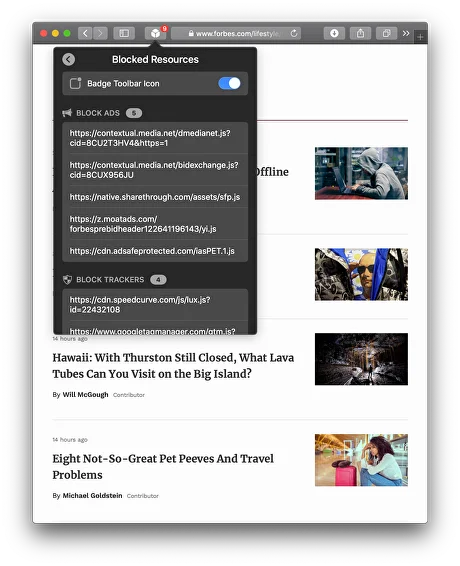
1Blocker is a Safari-native content blocker for iPhone, iPad, Mac, and Apple Vision Pro, built by 1Blocker LLC. It uses Apple’s Content Blocker API to remove ads, trackers, pop-ups, and fingerprinting scripts before pages even load — not after. It’s designed for Apple ecosystem users who want real control over what Safari loads, and it’s genuinely not suited for anyone who primarily uses Chrome, Firefox, or any browser other than Safari.
HOW IT WORKS
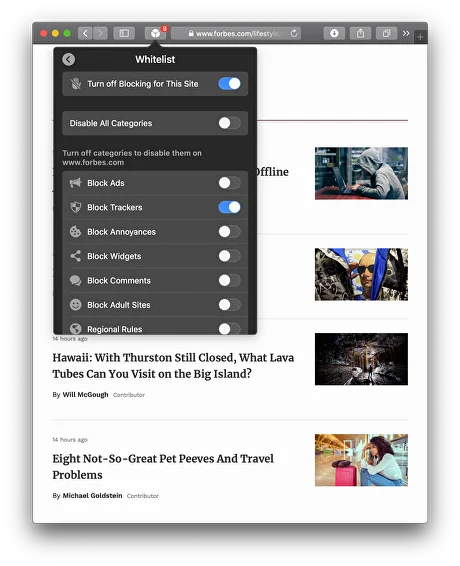
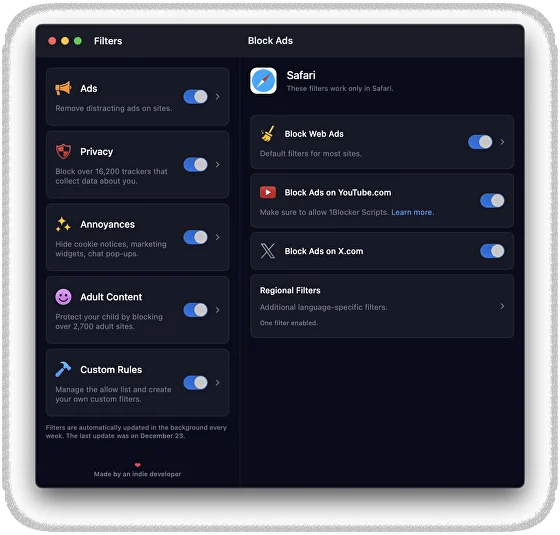
After you download the app, you enable it in Safari’s settings under Extensions (on iPhone) or Safari Preferences (on Mac). 1Blocker passes a block list of rules to Safari, which Safari applies natively — meaning 1Blocker itself never sees your browsing traffic. From that first launch, flipping on the Ads and Privacy toggles immediately starts stripping unwanted content from every site you open. If you want to go deeper, the Rules section lets you create custom element-hiding rules or whitelist sites you want to support. Your setup syncs to iCloud the moment you save it, so your Mac, iPhone, and iPad all stay consistent without any manual steps.
UX & DESIGN
The interface is clean, minimal, and unmistakably Apple-native — it feels like it belongs on iOS and macOS in a way that browser extensions never do. The category toggle layout (Ads, Privacy, Annoyances, Adult Content, Custom) is instantly understandable. The learning curve for basic use is near zero. Power users will find the custom rules editor straightforward once they understand the syntax, though newcomers may feel it’s underdocumented. On macOS Sonoma, the integration with Safari settings is smooth, and the app’s visual design holds up well on both Retina and non-Retina screens. Given the $14.99/year asking price, the polished experience earns its keep.
PERFORMANCE & RELIABILITY
Because 1Blocker uses Safari’s native Content Blocker API rather than a VPN or proxy, it adds almost no overhead to page loads — in fact, pages load measurably faster by not fetching ad scripts in the first place. There are no known widespread crash reports in recent App Store reviews. iCloud sync is reliable for preferences and custom rules, though it requires an active connection to propagate changes. Battery impact is minimal compared to VPN-based blockers, which maintain a persistent background tunnel; 1Blocker simply hands a rule list to Safari and steps back. Performance is consistent across iPhone 12 and newer and any Apple Silicon Mac.
PRIVACY & PERMISSIONS
1Blocker’s privacy stance is one of the strongest in its category, and it’s verifiable. The app’s privacy policy explicitly states it collects no personal data, does not track sites visited, and contains no analytics code. It uses Apple’s iCloud solely to sync your own preferences between your devices, and uses RevenueCat only to verify purchase receipts — RevenueCat has no access to browsing data. The Content Blocker API by design means 1Blocker never sits between you and the websites you visit; Safari enforces the rules internally. If you’re asking whether 1Blocker is safe for private data storage, the architecture makes it structurally incapable of logging your traffic — not just a policy promise.
PRICING & VALUE
The free tier of 1Blocker lets you block only one category at a time — meaning you can have Ads OR Privacy filtering enabled, but not both simultaneously. For anyone serious about blocking trackers and fingerprinting together, this makes the free tier impractical as a long-term setup. Premium costs $14.99 per year or a one-time $39.99 lifetime purchase. In India, App Store pricing varies with regional conversion rates, so check the current INR price in your local App Store listing. Compared to AdGuard, which also offers a freemium model but charges significantly more for its cross-platform subscription (especially if you want DNS-level protection across non-Safari browsers), 1Blocker’s lifetime plan is a strong value for Apple-only users.
HOW IT COMPARES
vs. AdGuard: 1Blocker wins on privacy architecture (no data collection, no VPN tunnel required for Safari blocking) and on pricing for lifetime Apple-only users. AdGuard wins when you need cross-browser support or system-wide DNS filtering that covers all apps, not just Safari.
vs. Wipr: 1Blocker wins on customisation — custom rules, per-site whitelisting, and category toggles give you real control. Wipr wins on simplicity: it’s a one-time $4.99 purchase with zero configuration required, and for users who just want ads gone without touching a single setting, Wipr delivers that.